Bamboo Forest Font: Natural Style for Web Design
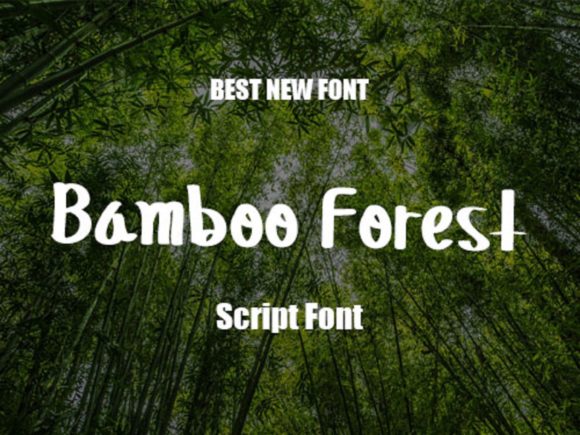
Bamboo Forest is a sweet and friendly handwritten font that brings a natural, unique touch to digital projects. As a web designer, I find it especially useful for creating engaging visual hierarchies and expressive brand identities. Its organic flow and soft curves make it ideal for headers, logos, and decorative accents that need to feel approachable and creative.
When used in web design, Bamboo Forest adds a human touch that can differentiate a site from the competition. It works well in hero sections, call-to-action buttons, and landing page headlines where a personal, inviting tone is essential. The font’s readability on screens makes it suitable for both large and small text sizes, ensuring clarity without sacrificing style.
Using Bamboo Forest in Web Layouts
In headers and section titles, Bamboo Forest creates a strong visual anchor that draws attention while maintaining a friendly tone. For example, on a creative portfolio site, using this font for project titles gives the page a warm, artistic feel that aligns with the work being showcased. On a boutique online store, it can be used for product headings or promotional banners to create a cohesive, branded aesthetic.
For CTA buttons, Bamboo Forest offers a stylish alternative to standard sans serif fonts. It adds personality without overwhelming the user, making it perfect for buttons like “Start Your Free Trial” or “Join Our Community.” When paired with a clean, modern sans serif for body copy, it helps maintain a balanced layout that’s easy to scan and read.
Readability and Visual Hierarchy
One of the key strengths of Bamboo Forest is its ability to enhance visual hierarchy. Its distinct shape and spacing allow it to stand out as a display font while still being legible in short phrases. This makes it great for headings, subheadings, and decorative elements that need to guide users through content without disrupting the flow.
On mobile screens, the font remains readable when used at appropriate sizes. For small buttons or icons, it’s best to keep the text minimal and avoid overcomplicating the design. When placed over dark backgrounds or image overlays, it maintains good contrast, especially when paired with light-colored text or outlined versions of the font.
Brand Tone and User Engagement
Bamboo Forest contributes to a brand’s tone by adding a sense of warmth and creativity. It’s particularly effective for brands that want to convey authenticity, such as eco-friendly products, wellness services, or artisanal businesses. The font’s softness can make a website feel more welcoming and trustworthy, encouraging users to engage more deeply with the content.
For a coaching website or a blog header, Bamboo Forest can be used to highlight key messages or introduce new posts. It also works well in social media graphics and email newsletters, where a personal, handwritten touch can increase engagement and recognition.
Font Pairing and Design Applications
Pairing Bamboo Forest with a simple sans serif font like Open Sans or Lato helps balance its decorative nature. This combination is ideal for landing pages, course sales pages, and digital templates where clarity and readability are crucial. For a more editorial look, pairing it with a serif font like Georgia or Merriweather can add sophistication and depth to the design.
When working on a digital brand kit, Bamboo Forest can serve as the primary display font for logos, banners, and marketing materials. It’s also useful for packaging design, where a handwritten touch can make a product feel more personal and unique. In web design, it supports consistent branding across multiple platforms, reinforcing the identity of a business or project.
Practical Considerations for Web Use
Before using Bamboo Forest in a live project, check the available styles, weights, and file formats. Many premium fonts include multiple variants that can be used for different design needs. Webfont availability is also important—ensuring that the font loads quickly and displays consistently across devices and browsers is key to a smooth user experience.
For commercial use, verify the licensing terms to ensure that the font can be used on websites, client projects, and online stores. Some fonts require additional licenses for web embedding or resale, so it’s always wise to review the usage rights carefully.
Bamboo Forest is a versatile tool for web designers and digital creators looking to add a personal, natural touch to their work. Whether used in a creative portfolio, an online shop, or a SaaS landing page, it brings a sense of warmth and approachability that can enhance the overall user experience. By understanding its strengths and limitations, you can leverage it effectively to support your design goals and brand vision.